You can export your transaction records, trading history, and account statements directly from BTSE. Reports are processed in the background and then delivered to your registered email address, so you can keep trading while your file is being prepared.
What kinds of data you can download
How can I download a transaction history report or account statement?
Log into your account and go to the page that contains the history you want to export:
Account → Transaction History
Trading → Trade History
Account → Account Statement
Click [Download Report]. A dialog box will emerge.
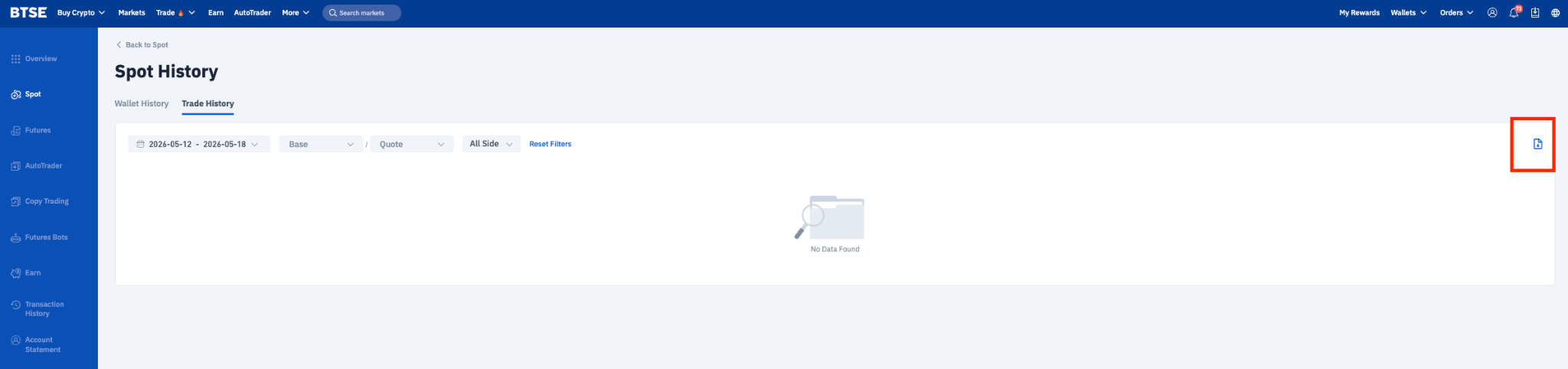
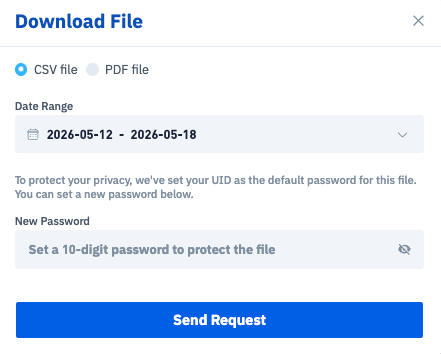
Select a preset date range or set a custom date range. Each request can cover up to a period of 12 months.
Click [Send Request] to submit.
You will receive an email with a download link once your report is ready. You can also retrieve the file from the Notification Center inside your account.
Note: Download links will remain valid for 72 hours after the email is sent. After that, please submit a new request.
What are the limits on filtering and downloading transaction and account statements?
FAQ
1. How long does it take to generate a report?
Most reports are ready within a few minutes. Larger date ranges may take longer.
2. How far back can I download data for?
You can request data back to your account creation date, with each request spanning up to 12 months. For longer periods, submit multiple requests.
3. Can I use these reports for tax filing purposes?
The reports include transaction details commonly used for tax reporting. We recommend consulting a local tax advisor for requirements specific to your jurisdiction.
4. I didn't receive an email — what should I do?
Check your spam or junk folder.
Confirm that your registered email address is verified under Account > Security.
Check your Notification Center, where the download link will also be available.
If the report still doesn't appear after an hour, please contact our support team.
5. My download link has expired. Can I get it back?
Links expire after 72 hours. Simply submit a new request to regenerate the report.
6. Which email address will receive sub-account reports?
If the sub-account has a registered email address, the report will be sent to that email address. Otherwise, it is sent to the sub account's notification center.
7. Can I download reports while trading?
Yes. Reports are processed in the background and won't interrupt your trading activity.
8. What's the difference between CSV and PDF?
CSV files are spreadsheet-compatible and support up to 50,000 records — ideal for analysis or importing into accounting tools. PDF files are easier to view and print, but are limited to 1,000 trade records.
Still need help?
If you have other questions, please contact our support team or visit our Help Center.

